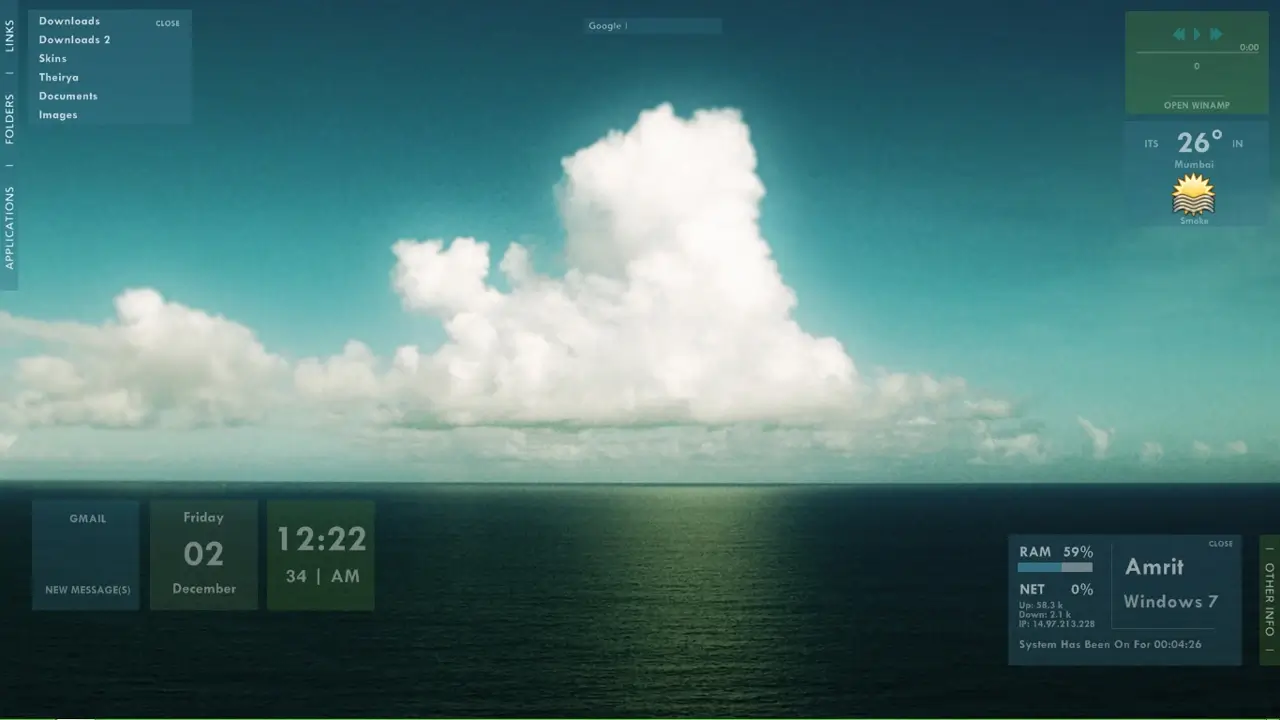
Styliish Rainmeter Media Player

Stylish Rainmeter Media Player: Elevate Your Music Experience with Subtle Sophistication
The Stylish Rainmeter Media Player is a sleek and minimalistic desktop enhancement designed to provide easy access to essential music controls. With a focus on simplicity, this skin allows you to play, pause, adjust volume, and navigate tracks seamlessly while adding a touch of style to your desktop.
Features:
- Intuitive Buttons:
- Play/Pause: Easily control playback with a single click.
- Volume Control: Adjust volume levels with up and down buttons.
- Next, Previous Track: Navigate through your playlist effortlessly.
- Seek Within Track:
- Fine-tune your listening experience by seeking within the current track.
- Dynamic Background:
- Experience the beat of your music with a background that pulsates to the rhythm, adding a subtle yet visually engaging element.
Customization:
While the Stylish Rainmeter Media Player embraces a minimalist design, you can further personalize it to suit your preferences:
- Adjust the size and position on your desktop.
- Modify color schemes to match your overall desktop theme.
Enhance your desktop audio experience with the Stylish Rainmeter Media Player. Its intuitive controls, seek functionality, and dynamic background make it a stylish addition to any desktop, offering both functionality and visual appeal. Download and install this skin to enjoy a seamless and visually engaging music player experience.
How to Install Styliish Rainmeter Media Player on Windows 10 / 11
- Install Rainmeter: Ensure you have the latest version of Rainmeter installed from the official website (rainmeter.net).
- Download the Skin Package: Click the "Download Skin" button on this page to save the skin package (.rmskin or .zip archive) to your computer.
- Load the Skin: Double-click the downloaded .rmskin file and click "Install" in the Rainmeter Skin Installer window (if it is a .zip/.rar archive, extract the folder into Documents\Rainmeter\Skins and click "Refresh all" in the Rainmeter Manager).
- Customize Your Desktop: Right-click any active widget on your desktop to adjust scale, transparency, coordinates, or skin variables to match your wallpaper.