ClockWorld Rainmeter Theme

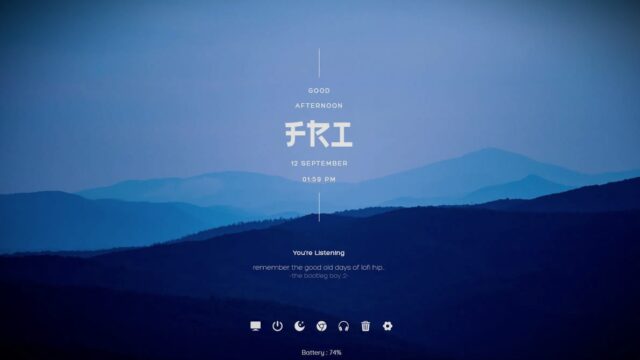
ClockWorld is an all-in-one Rainmeter suite designed to elevate your desktop experience with a perfect blend of productivity and aesthetics. This suite offers a comprehensive set of well-designed elements that are not only visually appealing but also incredibly easy to use, simplifying your daily tasks.
Features:
ClockWorld redefines your desktop productivity with a range of innovative features:
- Adaptive Quotes, Wallpapers, and Colors: Enjoy a dynamic and ever-changing desktop with adaptive quotes, wallpapers, and colors. ClockWorld keeps your environment fresh and inspiring as it automatically updates these elements to keep you engaged and motivated.
- Clock: Stay organized and punctual with a stylish and accurate clock widget. ClockWorld’s clock keeps you on schedule while seamlessly blending into your desktop’s aesthetic.
- Music Player with WebPlayer Support: Take control of your music effortlessly with the integrated music player. What’s more, ClockWorld supports WebPlayer, ensuring that you can enjoy your favorite tunes without hassle right from your desktop.
- Desktop Shortcuts: Access your frequently used applications and files with ease through desktop shortcuts. ClockWorld streamlines your workflow by providing quick and convenient access to your essential resources.
- Modern Settings UI: Customize ClockWorld to your heart’s content using the modern and intuitive settings user interface. Adjust and fine-tune the suite to match your preferences and desktop aesthetics effortlessly.
- Automatic Updates: ClockWorld keeps itself fresh and up-to-date. It automatically updates its elements, ensuring you always have access to the latest features and visuals.
Conclusion:
ClockWorld is your go-to Rainmeter suite for a simplified and productive desktop experience. With adaptive quotes, wallpapers, colors, a sleek clock, integrated music player with WebPlayer support, desktop shortcuts, a modern settings UI, and automatic updates, ClockWorld is designed to enhance your productivity and make your daily tasks a breeze.
How to Install ClockWorld Rainmeter Theme on Windows 10 / 11
- Install Rainmeter: Ensure you have the latest version of Rainmeter installed from the official website (rainmeter.net).
- Download the Skin Package: Click the "Download Skin" button on this page to save the skin package (.rmskin or .zip archive) to your computer.
- Load the Skin: Double-click the downloaded .rmskin file and click "Install" in the Rainmeter Skin Installer window (if it is a .zip/.rar archive, extract the folder into Documents\Rainmeter\Skins and click "Refresh all" in the Rainmeter Manager).
- Customize Your Desktop: Right-click any active widget on your desktop to adjust scale, transparency, coordinates, or skin variables to match your wallpaper.