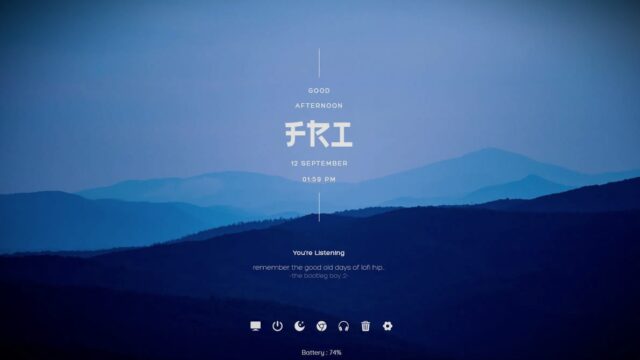
Just Plain Clean Rainmeter Skin

Simplify your desktop with the Just Plain Clean Rainmeter Skin. Its elegant design and minimalistic approach make it an excellent choice for users who appreciate a clean and uncluttered desktop.
The Just Plain Clean Rainmeter Skin is a minimalist and elegant addition to your desktop, focusing on providing a straightforward and stylish date and time display.
This skin offers a clean and uncluttered design, perfect for users who prefer a simple and refined desktop appearance.
Key Features:
Date and Time: The Just Plain Clean Rainmeter Skin primarily displays the current date and time. Its simplicity ensures that you can quickly check the time and date without any distractions.
Download and install this skin to add a touch of style and simplicity to your workspace.
How to Install Just Plain Clean Rainmeter Skin on Windows 10 / 11
- Install Rainmeter: Ensure you have the latest version of Rainmeter installed from the official website (rainmeter.net).
- Download the Skin Package: Click the "Download Skin" button on this page to save the skin package (.rmskin or .zip archive) to your computer.
- Load the Skin: Double-click the downloaded .rmskin file and click "Install" in the Rainmeter Skin Installer window (if it is a .zip/.rar archive, extract the folder into Documents\Rainmeter\Skins and click "Refresh all" in the Rainmeter Manager).
- Customize Your Desktop: Right-click any active widget on your desktop to adjust scale, transparency, coordinates, or skin variables to match your wallpaper.