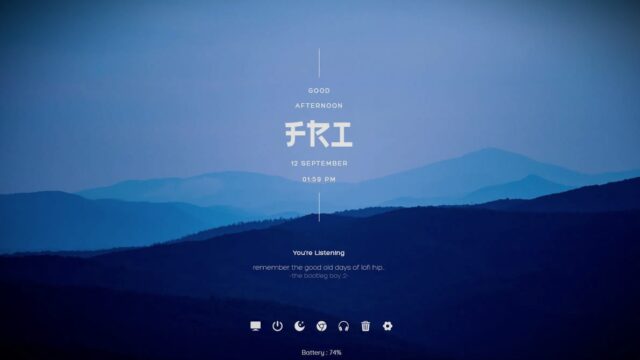
Pill Widgets Clock Rainmeter Skin

Introducing the Pill Widgets Clock Rainmeter Skin: A Vibrant and Functional Timekeeping Experience
Transform your desktop into a colorful and dynamic workspace with the Pill Widgets Clock Rainmeter Skin. This visually captivating Rainmeter skin offers a unique and interactive clock display, accompanied by additional widgets to enhance your productivity and style.
Pill Widgets Clock Rainmeter Skin – Features:
- Striking Pill Design: The Pill Widgets Clock Rainmeter Skin features a visually appealing pill-shaped design for its clock display. With its vibrant colors and smooth animations, it adds a touch of liveliness and creativity to your desktop environment, making it a delightful focal point.
- Customizable Interface: Personalize the appearance of the Pill Widgets Clock to suit your style and preferences. Customize the colors, transparency, and animation speed to create a unique and personalized look that seamlessly integrates with your desktop background.
Interact with the Pill Widgets Clock to access essential features and applications directly from your desktop.
Transform your desktop into a colorful and functional workspace with the Pill Widgets Clock Rainmeter Skin. Download and install this captivating skin today to elevate your desktop aesthetics and enhance your productivity in a visually engaging manner.
How to Install Pill Widgets Clock Rainmeter Skin on Windows 10 / 11
- Install Rainmeter: Ensure you have the latest version of Rainmeter installed from the official website (rainmeter.net).
- Download the Skin Package: Click the "Download Skin" button on this page to save the skin package (.rmskin or .zip archive) to your computer.
- Load the Skin: Double-click the downloaded .rmskin file and click "Install" in the Rainmeter Skin Installer window (if it is a .zip/.rar archive, extract the folder into Documents\Rainmeter\Skins and click "Refresh all" in the Rainmeter Manager).
- Customize Your Desktop: Right-click any active widget on your desktop to adjust scale, transparency, coordinates, or skin variables to match your wallpaper.