Canopy Rainmeter Skin
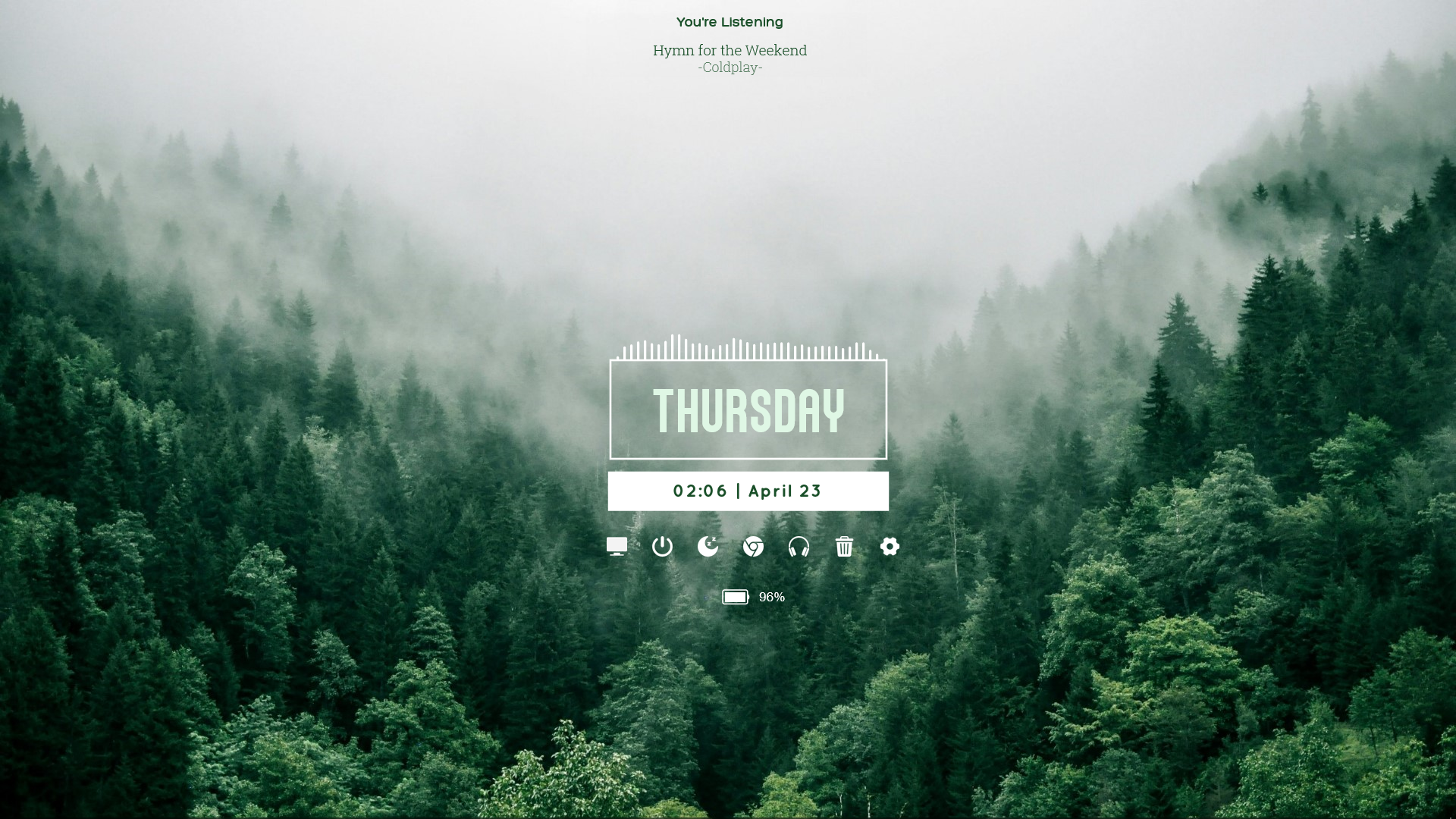
Give your Windows desktop a serene and refreshing makeover with Canopy Rainmeter Skin, a minimalist desktop customization suite that combines peaceful nature aesthetics with functional utility. Designed by aohiocawhda, this setup features an atmospheric foggy forest wallpaper paired with a clean digital clock, media playback info, a sound visualizer, and quick application launchers.
Canopy is an exceptional choice for users who appreciate clean, uncluttered desktop layouts. By blending organic forest tones with modern typographic elements, it ensures your workspace remains organized while keeping vital system indicators and frequently used shortcuts readily accessible.
About the Canopy Rainmeter Skin
Canopy is built around a tranquil woodland theme, complete with a high-resolution foggy forest landscape wallpaper that sets a relaxing tone for your entire workspace. The visual elements maintain a cohesive, elegant style with soft color palettes and clean geometric containers.
The skin provides essential daily utilities without overwhelming your screen. It includes dedicated modules for tracking time, monitoring battery status, controlling music playback, and visualizing audio output in real time. Everything is arranged to maintain a balanced look against the misty background.
The skin includes five main Rainmeter components: Battery, Clock, Dock, Music Info, and Visualizer. These can be managed independently through the Rainmeter application, allowing you to position and customize them according to your preferences.
Canopy Rainmeter Skin — Features & Highlights
1. Minimalist Digital Clock
The Canopy clock widget displays the current day, date, and time using elegant typography. It relies on the Atyan Dsegh and Quicksand font families to deliver a crisp, modern look that complements the overall theme.
This module supports both 12-hour and 24-hour time formats through the shared configuration variables, ensuring it adapts smoothly to your personal preferences.
2. Audio Visualizer and Sound Spectrum Widget
The suite features a dedicated desktop sound spectrum widget powered by the AudioLevel plugin. It renders real-time audio visualizer widgets dynamically across your screen whenever music or media is playing.
The visualizer responds fluidly to system sound frequencies, adding an immersive, living element to your peaceful forest desktop environment.
3. Music Info and Media Control
Integrated with WebNowPlaying, the music module displays currently playing track titles, artist names, and playback details. It seamlessly connects with popular media players and browser extensions for smooth track management.
4. Battery Percentage Monitor and Power Options
The laptop battery monitor utilizes Rainmeter's PowerPlugin to track remaining battery levels and charging status in real time. It works alongside rainmeter power option widgets to give you immediate oversight of your power state.
5. Application Dock and Shortcut Launcher
The translucent application dock provides quick access to essential system locations and tools. It includes smooth mouse hover effects and is pre-configured with shortcuts for This PC, Windows Settings, Google Chrome, Recycle Bin, and Sleep / Lock actions.
6. Customizable Appearance
All core settings are centralized in a shared Variables.inc configuration file, allowing you to easily adjust widget scaling, color palettes, time formats, and launcher paths without editing individual component files.
7. Included Foggy Forest Wallpaper
The package comes bundled with an atmospheric 2.0 MB foggy forest wall.jpg wallpaper that perfectly matches the default color scheme and layout of the Rainmeter widgets.
Frequently Asked Questions — Canopy Rainmeter Skin
What widgets are included in the Canopy Rainmeter skin?
Canopy includes a minimalist digital clock and date display, an audio visualizer, a music info player, a battery percentage monitor, and an application dock launcher.
How do I customize the clock format and shortcuts?
You can easily modify 12h/24h time formats, colors, scaling, and dock shortcuts by editing the Variables.inc file located in your Canopy @Resources folder.
Is Canopy compatible with Windows 10 and Windows 11?
Yes, Canopy is fully compatible with modern versions of Windows running Rainmeter 4.5.23 or newer.
Do I need extra plugins for the music widget to work?
The music info widget requires the WebNowPlaying plugin and its corresponding browser extension if you are streaming music from web players.
Does the package include a wallpaper?
Yes, the skin package includes a high-resolution foggy forest wallpaper that matches the default theme layout.
How to Install Canopy Rainmeter Skin in Rainmeter
- Install Rainmeter: Ensure you have Rainmeter (4.5 or newer) installed from the official website (rainmeter.net).
- Download the Skin Package: Click the "Download Skin" button on this page to save the skin file (.rmskin or .zip archive) to your computer.
- Load the Skin: Double-click the downloaded .rmskin file and click "Install" in the Rainmeter Skin Installer prompt (if it is a .zip/.rar archive, extract the folder into Documents\Rainmeter\Skins and click "Refresh all" in the Rainmeter Manager).
- Customize Your Desktop: Right-click any active widget on your desktop to adjust scale, transparency, coordinates, or skin variables to match your wallpaper.
aohiocawhda
aohiocawhda is the creator and designer behind Canopy Rainmeter Skin.