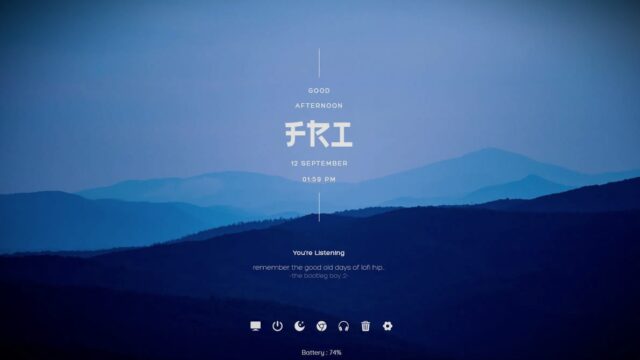
Work Launcher [1.3] Rainmeter Skin

The Work Launcher [1.3] Rainmeter Skin is a feature-packed desktop dock that simplifies access to your favorite applications and tools. This highly customizable skin serves as a central hub for launching your most-used programs, helping you work efficiently and stylishly from your desktop.
Key Features:
- Dock for Quick Access: The Work Launcher skin functions as a dock, providing a visually appealing and convenient location to pin and launch your preferred applications. It eliminates the need to search through menus or icons, saving you time and enhancing productivity.
- Customizable Appearance: The skin offers a range of customization options, allowing you to tailor its appearance to match your desktop’s aesthetic. Modify the background, icons, and other visual elements to create a personalized and visually pleasing workspace.
- One-Click Launch: With a single click on your chosen icon, you can instantly open your favorite applications. This streamlined access to your tools makes for a more efficient workflow.
This desktop dock streamlines access to your essential applications and provides extensive customization options to ensure it blends seamlessly with your desktop’s aesthetic. Download and install this skin to simplify and enhance your desktop experience.
How to Install Work Launcher [1.3] Rainmeter Skin on Windows 10 / 11
- Install Rainmeter: Ensure you have the latest version of Rainmeter installed from the official website (rainmeter.net).
- Download the Skin Package: Click the "Download Skin" button on this page to save the skin package (.rmskin or .zip archive) to your computer.
- Load the Skin: Double-click the downloaded .rmskin file and click "Install" in the Rainmeter Skin Installer window (if it is a .zip/.rar archive, extract the folder into Documents\Rainmeter\Skins and click "Refresh all" in the Rainmeter Manager).
- Customize Your Desktop: Right-click any active widget on your desktop to adjust scale, transparency, coordinates, or skin variables to match your wallpaper.