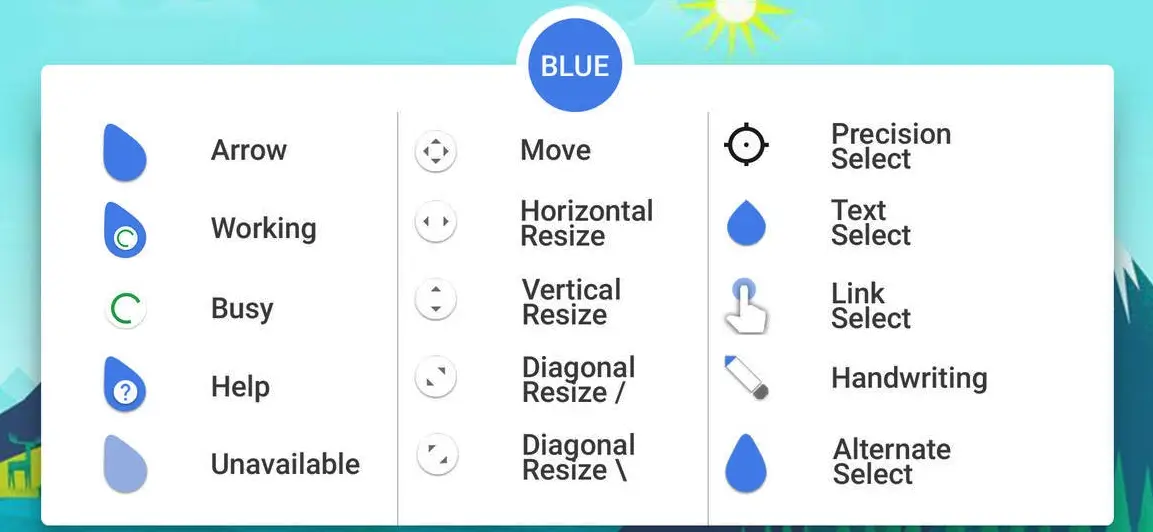
Anathema Custom Cursors for Windows

Anathema cursor for Windows. It’s got a clean, modern design for those who are looking for a cursor that is simplistic but interesting. There are 4 versions of anathema cursors, and all of them are animated.
About Anathema Custom Cursors
This cursor has four variants (Red, White, Blue, and Pink) made by a user Anaidon-Aserra on DeviantArt. All the cursors are free to download.
Download Anathema Cursor
- Click the download button below
- Download the skin and make your own!
How to Install Anathema Custom Cursors for Windows on Windows 10 / 11
- Install Rainmeter: Ensure you have the latest version of Rainmeter installed from the official website (rainmeter.net).
- Download the Skin Package: Click the "Download Skin" button on this page to save the skin package (.rmskin or .zip archive) to your computer.
- Load the Skin: Double-click the downloaded .rmskin file and click "Install" in the Rainmeter Skin Installer window (if it is a .zip/.rar archive, extract the folder into Documents\Rainmeter\Skins and click "Refresh all" in the Rainmeter Manager).
- Customize Your Desktop: Right-click any active widget on your desktop to adjust scale, transparency, coordinates, or skin variables to match your wallpaper.