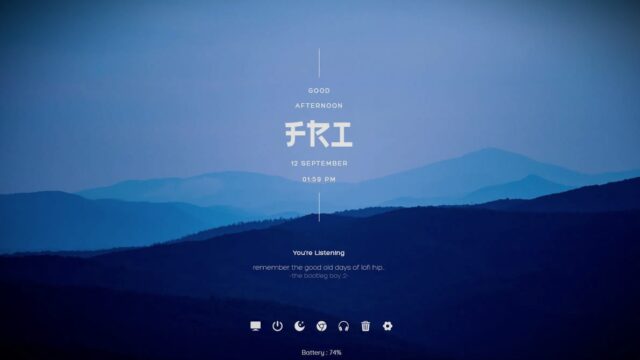
Frost Visualizer Rainmeter Skin

The Frost Visualizer Rainmeter Skin is a popular audio visualizer skin designed for Rainmeter, a desktop customization platform on Windows. Rainmeter allows users to customize their desktop widgets, including visualizers, clocks, system monitors, weather displays, and more.
About Frost Visualizer:
The Frost Visualizer Rainmeter Skin provides a sleek and modern audio visualizer for your desktop, creating real-time visualizations based on your computer’s audio output. It’s perfect for music enthusiasts and those who want to add a visual element to their desktop.
This visualizer offers a range of customizable options, allowing you to adjust the size, color, shape, and style to match your preferences. With support for various modes like bars, waves, particles, and circles, you can customize sensitivity and responsiveness to suit the audio input.
This skin is created by a user named alatsombath on DeviantArt. He is popular for creating popular audio visualizers for rainmeter like Fountain of Colors
Conclusion:
In conclusion, Frost Visualizer Rainmeter Skin is a popular choice for users seeking an elegant and customizable audio visualizer for their desktops. With its real-time synchronization and a wide range of customization options, it offers an immersive visual experience for music enthusiasts and desktop customization enthusiasts alike. Enhance your desktop environment with the Frost Visualizer Rainmeter Skin and enjoy personalized audio visualizations that bring your music to life.
Download Frost visualizer Rainmeter Skin:
- Click on the button Below
- Download the skin and make your own!
- Then Extract the (.rar) Install the (.rmskin) file and Enjoy!
How to Install Frost Visualizer Rainmeter Skin on Windows 10 / 11
- Install Rainmeter: Ensure you have the latest version of Rainmeter installed from the official website (rainmeter.net).
- Download the Skin Package: Click the "Download Skin" button on this page to save the skin package (.rmskin or .zip archive) to your computer.
- Load the Skin: Double-click the downloaded .rmskin file and click "Install" in the Rainmeter Skin Installer window (if it is a .zip/.rar archive, extract the folder into Documents\Rainmeter\Skins and click "Refresh all" in the Rainmeter Manager).
- Customize Your Desktop: Right-click any active widget on your desktop to adjust scale, transparency, coordinates, or skin variables to match your wallpaper.