Restona Rainmeter Theme (UPDATED 2023)

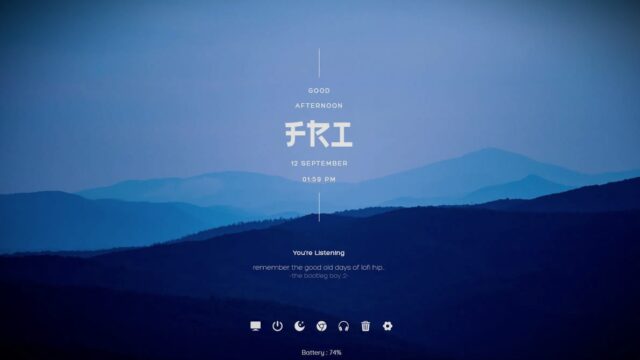
The Restona Rainmeter Theme enhances your desktop with essential components such as a stylish clock, real-time weather updates, and a sleek music player.
Below, you’ll find a detailed breakdown of the included features and steps for installing and customizing this theme.
Restona Rainmeter Theme (UPDATED 2023) — Key Features & Highlights
- Time:The Restona Rainmeter Theme includes a stylish clock that not only serves its functional purpose but also adds a touch of elegance to your desktop. Stay informed about the current time in a visually appealing format.
- Weather:Real-time weather updates keep you informed about the current weather conditions. This feature provides essential information, such as temperature, weather conditions, and more, offering a quick glance at the day's forecast.
- Music Player:The inclusion of a sleek music player widget allows you to control and manage your music playback directly from your desktop. Access play, pause, next, and previous track controls with ease.
How to Install Restona Rainmeter Theme (UPDATED 2023) on Windows 10 / 11
- Install Rainmeter: Ensure you have the latest version of Rainmeter installed from the official website (rainmeter.net).
- Download the Skin Package: Click the "Download Skin" button on this page to save the skin package (.rmskin or .zip archive) to your computer.
- Load the Skin: Double-click the downloaded .rmskin file and click "Install" in the Rainmeter Skin Installer window (if it is a .zip/.rar archive, extract the folder into Documents\Rainmeter\Skins and click "Refresh all" in the Rainmeter Manager).
- Customize Your Desktop: Right-click any active widget on your desktop to adjust scale, transparency, coordinates, or skin variables to match your wallpaper.