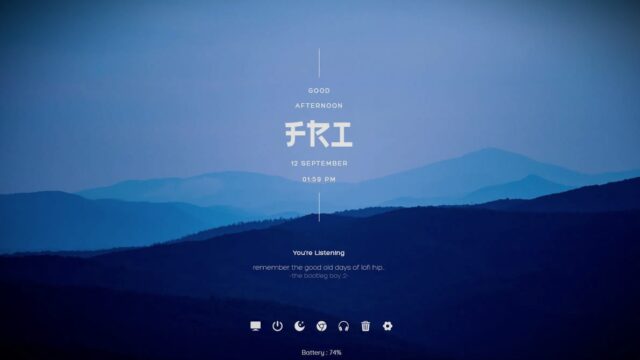
Simple Color Rainmeter Suite

Transform your desktop into a colorful and dynamic workspace with the Simple Color Rainmeter Suite. This comprehensive suite offers a range of widgets and features, enhancing both the visual appeal and functionality of your desktop environment.
Simple Color Rainmeter Suite — Key Features & Highlights
- Greeting:Start your day with a personalized greeting that adds a friendly touch to your desktop.
- Time and Date:Stay organized with a sleek clock widget displaying the current time and date in a format that suits your preferences.
- Weather Updates:Receive real-time weather information, ensuring you're prepared for the day ahead. The weather widget provides key details to keep you informed.
- Navigation:Streamline access to your favorite applications and games with the navigation section. Quickly launch your most-used software for a more efficient workflow.
- System Statistics:Keep an eye on your system's performance with detailed statistics. Monitor key metrics, ensuring your computer is running optimally.
- Audio Output Switcher:Easily manage your audio output settings with the included switcher. This feature provides quick access to control your audio devices.
- Now Playing Information:Stay in tune with your music by displaying real-time information about the currently playing track. The Now Playing widget adds a musical element to your desktop.
Elevate your desktop experience with the Simple Color Rainmeter Suite. This suite not only enhances the visual appeal of your desktop with vibrant elements but also introduces practical widgets for improved organization and efficiency. Download and install the Simple Color Rainmeter Suite today to infuse your desktop with color and functionality.
How to Install Simple Color Rainmeter Suite on Windows 10 / 11
- Install Rainmeter: Ensure you have the latest version of Rainmeter installed from the official website (rainmeter.net).
- Download the Skin Package: Click the "Download Skin" button on this page to save the skin package (.rmskin or .zip archive) to your computer.
- Load the Skin: Double-click the downloaded .rmskin file and click "Install" in the Rainmeter Skin Installer window (if it is a .zip/.rar archive, extract the folder into Documents\Rainmeter\Skins and click "Refresh all" in the Rainmeter Manager).
- Customize Your Desktop: Right-click any active widget on your desktop to adjust scale, transparency, coordinates, or skin variables to match your wallpaper.