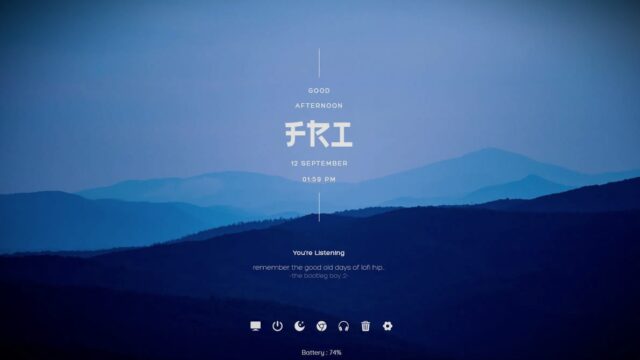
Simplistic Bar Rainmeter Skin

Elevate your desktop’s aesthetics and functionality with the Simplistic Bar Rainmeter Skin 2.0. This skin introduces a clean and streamlined bar design that seamlessly integrates essential information and shortcuts for a more organized desktop experience.
Simplistic Bar Rainmeter Skin — Key Features & Highlights
- Clock Integration:
- The Simplistic Bar Rainmeter Skin now incorporates a clock widget, ensuring you have easy access to the current time without compromising the clean design.
- Weather Updates:
- Stay informed about the weather with the integrated weather widget. Receive real-time updates on current conditions, making the Simplistic Bar a one-stop solution for both time and weather.
- Uptime Monitoring:
- Keep track of your system's uptime directly on your desktop. The uptime feature provides a quick reference to how long your computer has been running without a restart.
- Shortcut Access:
- Access frequently used applications and locations with the included shortcuts. The Simplistic Bar provides quick links to essential areas such as Computer, Recycle Bin, Control Panel, Browser, and Media Player.
Upgrade your desktop's visual appeal and functionality with the Simplistic Bar Rainmeter Skin 2.0. This skin introduces a harmonious blend of essential information and shortcuts within a sleek bar design.
How to Install Simplistic Bar Rainmeter Skin on Windows 10 / 11
- Install Rainmeter: Ensure you have the latest version of Rainmeter installed from the official website (rainmeter.net).
- Download the Skin Package: Click the "Download Skin" button on this page to save the skin package (.rmskin or .zip archive) to your computer.
- Load the Skin: Double-click the downloaded .rmskin file and click "Install" in the Rainmeter Skin Installer window (if it is a .zip/.rar archive, extract the folder into Documents\Rainmeter\Skins and click "Refresh all" in the Rainmeter Manager).
- Customize Your Desktop: Right-click any active widget on your desktop to adjust scale, transparency, coordinates, or skin variables to match your wallpaper.