Simplistic Clock RAINMETER

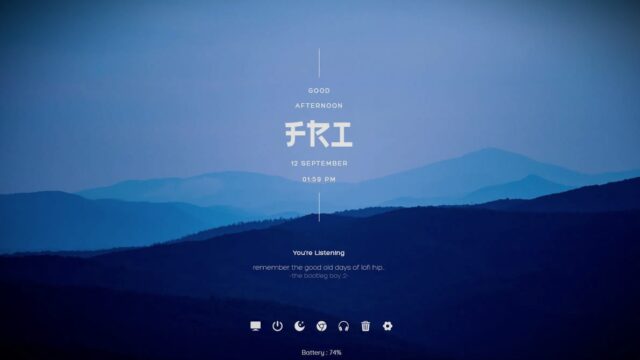
Elevate your desktop experience with the Simplistic Clock Rainmeter Skin – a perfect blend of minimalism and functionality.
This Rainmeter skin brings a sleek and modern clock design to your desktop, offering a clutter-free yet informative widget for timekeeping.
Simplistic Clock RAINMETER — Key Features & Highlights
- Minimalist Clock Design:The Simplistic Clock Rainmeter Skin features a clean and minimalist clock design, providing a visually pleasing and unobtrusive element for your desktop.
- Digital Time Display:Display the current time in a digital format for quick and easy readability. The simplicity of the design ensures that the clock seamlessly integrates with various desktop backgrounds.
- Date and Day Information:Enhance your timekeeping experience with additional information on the current date and day. Stay organized and informed at a glance.
- Customization Options:The skin offers customization options through the Rainmeter settings menu. Tailor the appearance of the clock to suit your preferences by adjusting colors, fonts, and other visual elements.
Experience the beauty of simplicity on your desktop with the Simplistic Clock Rainmeter Skin.
This skin combines a minimalist design with essential timekeeping features, creating an unobtrusive yet functional element for your desktop environment.
How to Install Simplistic Clock RAINMETER on Windows 10 / 11
- Install Rainmeter: Ensure you have the latest version of Rainmeter installed from the official website (rainmeter.net).
- Download the Skin Package: Click the "Download Skin" button on this page to save the skin package (.rmskin or .zip archive) to your computer.
- Load the Skin: Double-click the downloaded .rmskin file and click "Install" in the Rainmeter Skin Installer window (if it is a .zip/.rar archive, extract the folder into Documents\Rainmeter\Skins and click "Refresh all" in the Rainmeter Manager).
- Customize Your Desktop: Right-click any active widget on your desktop to adjust scale, transparency, coordinates, or skin variables to match your wallpaper.