Someday Clock RAINMETER

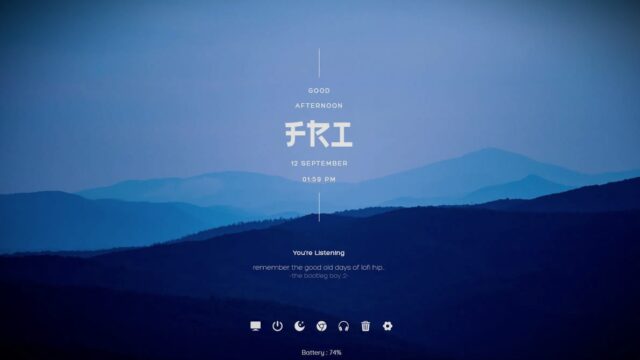
Introducing Someday, a Rainmeter skin that brings simplicity and elegance to your desktop with a focus on essential timekeeping. This skin features a minimalistic clock widget accompanied by the date and day, providing a clean and functional addition to your desktop environment.
Someday Clock RAINMETER — Key Features & Highlights
Someday Rainmeter Skin offers a simple yet elegant solution for users who prioritize a clean and functional clock widget on their desktops.
- Simple Clock Design:Enjoy a straightforward and uncluttered clock design that prioritizes readability.
- Date and Day Display:Stay organized with additional widgets showcasing the current date and day of the week.
- Minimalistic Aesthetic:Embrace a minimalist approach to desktop customization, keeping your screen clutter-free.
- Customizable Elements:Tailor the appearance of Someday to match your preferences through available customization options.
With an emphasis on readability and a minimalistic aesthetic, Someday enhances your desktop experience without unnecessary distractions. Download and install Someday to bring a touch of simplicity and elegance to your daily computing routine.
How to Install Someday Clock RAINMETER on Windows 10 / 11
- Install Rainmeter: Ensure you have the latest version of Rainmeter installed from the official website (rainmeter.net).
- Download the Skin Package: Click the "Download Skin" button on this page to save the skin package (.rmskin or .zip archive) to your computer.
- Load the Skin: Double-click the downloaded .rmskin file and click "Install" in the Rainmeter Skin Installer window (if it is a .zip/.rar archive, extract the folder into Documents\Rainmeter\Skins and click "Refresh all" in the Rainmeter Manager).
- Customize Your Desktop: Right-click any active widget on your desktop to adjust scale, transparency, coordinates, or skin variables to match your wallpaper.