NeoGauge Rainmeter Skin
Upgrade your Windows desktop with NeoGauge Rainmeter Skin, an advanced hardware monitoring suite featuring smooth animated rings, warning color indicators, and a comprehensive configuration tool. Designed by NorbertRuff, this rework of the popular 2023 release brings high-DPI support, optimized CPU performance, and extensive customization options for tracking your hardware metrics in real time.
NeoGauge is an exceptional choice for power users and enthusiasts who want detailed system telemetry without cluttering their workspace. Instead of overwhelming your desktop with chaotic windows, it presents core statistics through elegant, modular ring gauges that integrate seamlessly into any minimalist or tech-themed setup.
About the NeoGauge Rainmeter Skin
NeoGauge is built around a modern circular aesthetic that displays live performance metrics through dynamic ring animations. The visual design emphasizes clarity, utilizing the bundled Ubuntu Nerd Font and Segoe UI to present numbers and labels crisply across 125% to 200% high-DPI displays. Whether you are tracking background network traffic or keeping an eye on your system temperatures, the visual elements maintain a polished look that complements high-end custom desktops.
The package includes a comprehensive settings window and a robust set of individual gauges that cover every aspect of your hardware. Performance is exceptionally lightweight, running on about a third of the CPU resources of its predecessor while offering advanced effects like glow, peak-hold ticks, and comet tails.
The skin includes twelve main Rainmeter components: _bars, Battery, Config, Disks, Memory, Network, Processor, Recycle Bin, Temps, Time, UpTime, and Volume. These can be managed independently through the Rainmeter application, allowing you to position and customize them according to your preferences.
NeoGauge Rainmeter Skin — Features & Highlights
1. System CPU RAM Usage Widget
The processor and memory components provide comprehensive rainmeter cpu ram usage widget functionality, tracking real-time load percentages across individual CPU cores, threads, and physical memory.
It features advanced monitoring via the AdvancedCPU plugin and supports a 4, 8, or 16-column thread grid. The widgets utilize smooth ring animations and peak-hold tracking to display session highs and lows accurately.
- Real-time CPU percentage and core telemetry
- Physical RAM and swap usage tracking
- Configurable warning thresholds and peak indicators
2. System Hardware Monitor Widget
NeoGauge serves as a complete rainmeter system monitor widgets suite, giving you deep visibility into hardware health and disk activity.
It supports PerfMon and SysInfo plugins for tracking disk I/O across up to five drives, network upload and download bandwidth speeds, and wireless signal status.
- Drive activity and used space monitoring for up to 5 disks
- Network bandwidth tracking for upload and download speeds
- Interactive mouse hover effects and tooltips
3. Rainmeter Temperature Widget
The temperature module acts as a powerful rainmeter temperature widget, offering real-time monitoring for your processor, graphics card, RAM, storage drives, cooling pumps, and fans.
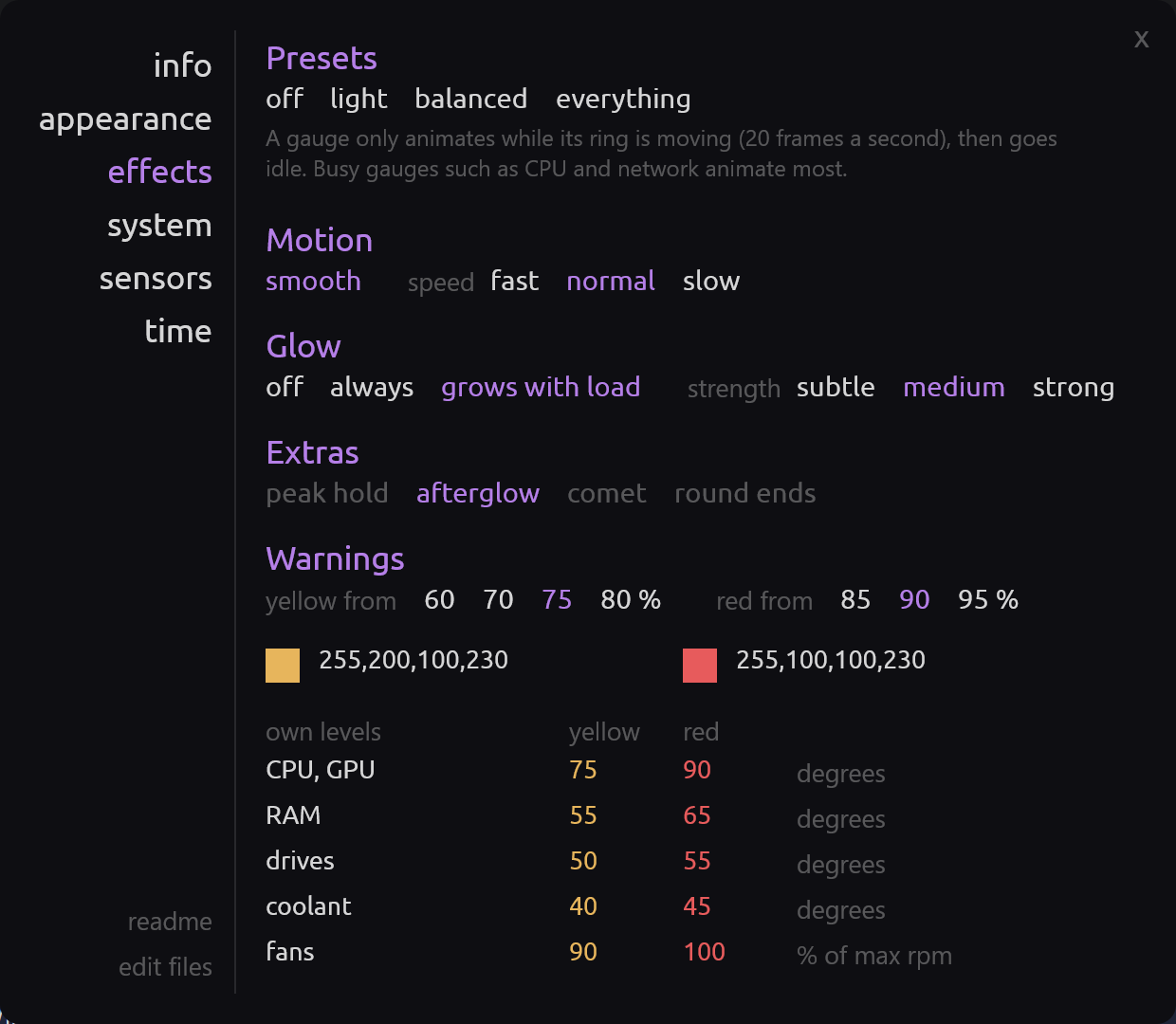
Working alongside HWiNFO64 via the sensors configuration page, it features auto-assign capabilities and warning color triggers that shift from green to yellow at 75% and red at 90% load.
- CPU, GPU, RAM, and disk temperature tracking
- Fan speed and liquid cooling pump telemetry
- Customizable warning and alert temperature thresholds
4. Rainmeter Time Widget & Clock
The time module functions as a reliable rainmeter time widget and rainmeter clock and date widgets combination, keeping your schedule front and center.
It supports both 12-hour and 24-hour clock formats through straightforward configuration variables and pairs seamlessly with the system uptime counter.
- Accurate digital clock and calendar date display
- Support for 12h and 24h time formatting
- System uptime tracking component
5. Desktop Utilities & Power Widgets
While NeoGauge focuses primarily on hardware gauges, it includes utility components that can complement rainmeter power option widgets or rainmeter shutdown restart widget setups.
It features a battery percentage monitor using the PowerPlugin, a volume control module, and a Recycle Bin manager.
- Live laptop battery percentage and charging indicator
- Windows audio volume control widget
- Recycle Bin item count and size monitor
6. Customizable Appearance & Config Tool
The skin features a centralized settings window across six dedicated pages: info, appearance, effects, system, sensors, and time.
Available customization options include:
- Widget scale, sizing, and high-DPI adjustments
- Ring animation effects including glow, easing, and peak-hold ticks
- Text, accent, and indicator color palettes
- Typography selection featuring the bundled Ubuntu Nerd Font
- Sensor setup and auto-assign tools for HWiNFO integration
Frequently Asked Questions — NeoGauge Rainmeter Skin
What widgets are included in the NeoGauge Rainmeter skin?
NeoGauge includes twelve main component folders: Processor (CPU and thread grids), Memory (RAM and swap), Disks (drive activity and storage space), Network (upload, download, and Wi-Fi), Temps (CPU, GPU, fan, and pump stats), Time and UpTime, Battery, Volume, Recycle Bin, and the central Config settings window.
How do I customize settings, colors, and animations in NeoGauge?
You can customize NeoGauge entirely through its built-in configuration tool (Config.ini), which opens automatically upon installation. It features six dedicated pages for managing appearance, ring effects, system scales, time formats, and sensor assignments without editing text files manually.
Are temperature and fan gauges supported out of the box?
Temperature and fan gauges require HWiNFO64 running in the background with reporting to gadgets enabled. The config tool includes a dedicated sensors page with an auto-assign feature to easily pair your hardware sensors with the gauges.
Is NeoGauge compatible with Windows 10 and 11 high-DPI displays?
Yes, NeoGauge fully supports Windows 10 and 11 with high-DPI scaling from 125% to 200%. All fonts, including the bundled Ubuntu Nerd Font, and vector ring graphics render sharply at any display scale.
How do I update NeoGauge from version 1.0 to version 2.0?
You can install version 2.0 directly over your existing 1.0 installation. Your settings and appearance variables are automatically preserved, while older files are moved to a backup directory.
How to Install NeoGauge Rainmeter Skin in Rainmeter
- Install Rainmeter: Ensure you have Rainmeter (4.5 or newer) installed from the official website (rainmeter.net).
- Download the Skin Package: Click the "Download Skin" button on this page to save the skin file (.rmskin or .zip archive) to your computer.
- Load the Skin: Double-click the downloaded .rmskin file and click "Install" in the Rainmeter Skin Installer prompt (if it is a .zip/.rar archive, extract the folder into Documents\Rainmeter\Skins and click "Refresh all" in the Rainmeter Manager).
- Customize Your Desktop: Right-click any active widget on your desktop to adjust scale, transparency, coordinates, or skin variables to match your wallpaper.
NorbertRuff
NorbertRuff is the creator and designer behind NeoGauge Rainmeter Skin.